

In today’s fast changing digital environment time is our most valuable asset. A huge portion of professionals students and content creators spend hours every week on repetitive micro tasks like organizing messy emails creating summaries of long documents schedule formatting or drafting social media captions.
Previously programming skills or expensive enterprise software were needed to automate an entire workflow of work however modern artificial intelligence has made this process simpler. Spending extra time to learn complex systems is no longer required now. By using easily available tools you can now automate daily important tasks in under 10 minutes.
In this practical guide we will discuss how to streamline real world tasks which will include testing notes visual configurations and a clear execution plan.
1. Summarizing Massive PDFs and Long Meeting Transcripts
Observing a 30 page PDF report or listening to audio of a 45 minute team meeting just for the purpose of collecting 3 required action points is an extreme waste of time and productivity.
Instead of reading manually word by word you can input the document into a large language model or a specific document summarizer. Within just a few seconds AI will extract and provide key decisions required tasks and deadlines.
How to configure in 3 minutes:
- Open your AI assistant or document analyzer interface.
- Upload the relevant PDF file or paste the meeting transcript.
- Apply this specific prompt: “Extract the top 5 decisions made in this document and list all action items with assigned names in a bulleted list.”
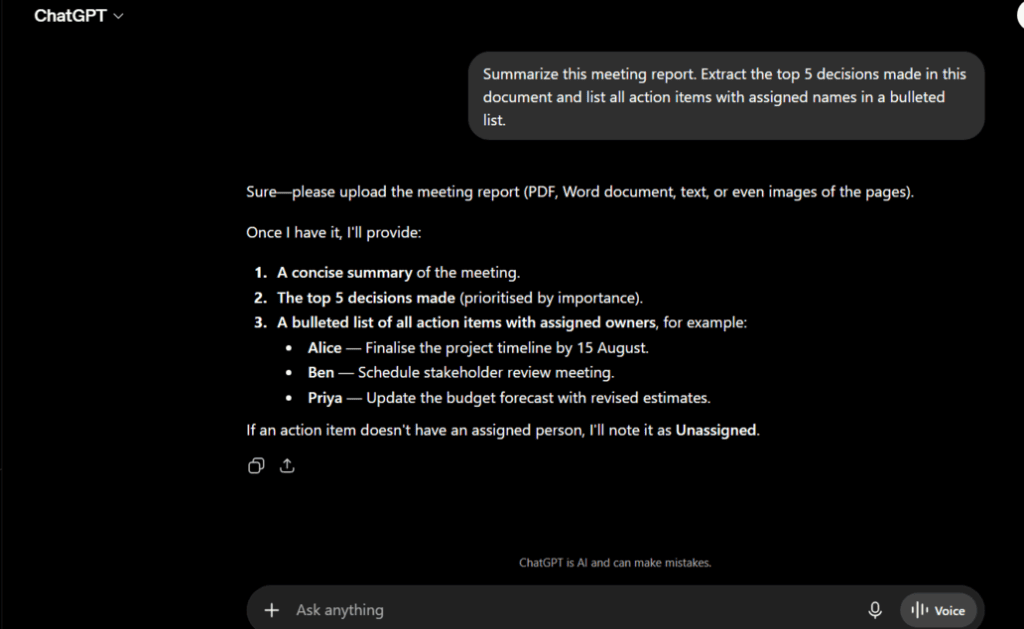
💡 My Observation & Personal Opinion:
During the first time testing AI summarization in the case of technical reports I had doubts regarding the accuracy of information. However if specific boundaries are set in the prompt AI does not skip any urgent data. This single configuration reduces document review time by almost 80% which helps focus directly on decision making instead of passive reading.
2. Automating Daily Email Responses and Drafts
Managing a full inbox is a daily challenge. A huge amount of mental energy is spent writing polite follow ups customer inquiry replies or status updates which should be reserved for important professional work.
Through custom prompt templates or lightweight AI email assistants it is possible to generate professional email drafts instantly by inputting short bullet points.
How to configure in 4 minutes:
- Instead of manually typing a 200 word reply type a 10 word shorthand note in the AI tool.
- Shorthand example: “Agree to the meeting on Tuesday at 3 PM ask for the agenda link polite tone.”
AI will expand this summary note into a complete and flawless professional email within two seconds.
Accessing Free Purpose-Built AI Workflows
Designing separate prompts for each individual task might feel time consuming. If you want to simplify your workflow without subscribing to multiple paid services you can use our [Free AI Tools on TexLab AI] directory.
Specialized AI Content Writer for your work Script Writer for video AI SEO Expert for keyword analysis or AI Multi-Translator for all tools on the same dashboard completely eliminates the necessity of manual prompt engineering.

3. Creating Content Schedules and Social Media Captions
Ideas constantly need to be generated for social media management or managing blog content calendars. Creating engaging titles relevant hashtags and diverse captions every day creates creative burnout or mental fatigue.
This structured content generation is extremely easy through AI technology. By using a single prompt it is possible to extract necessary social media posts or content ideas for an entire week.
How to configure in 3 minutes:
- Input the topic or product features of your main article to AI.
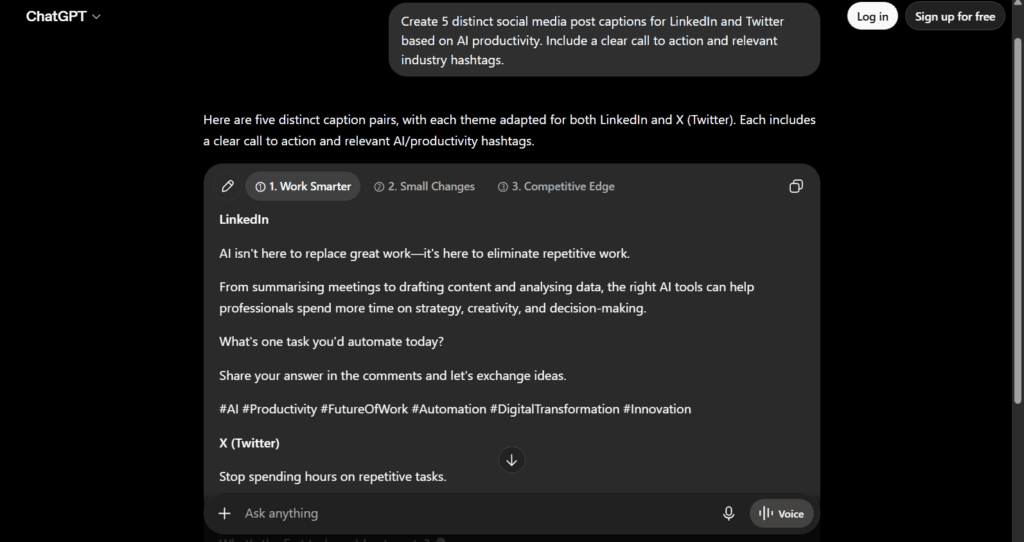
- Prompt: “Create 5 distinct social media post captions for LinkedIn and Twitter based on this topic. Include a clear call to action and relevant industry hashtags.”
Observe the received content add personal observations and complete scheduling through a buffer tool.
4. Cleaning and Reformatting Unstructured Data
Manual data cleanup is extremely time consuming when constantly transferring data from various websites PDF tables or unstructured text blocks into Microsoft Excel or Google Sheets. Rearranging names email filtering and organizing messy lists wastes valuable time.
Artificial intelligence models are extremely efficient at transforming unwanted and unstructured text into a clean CSV or well organized table format within a moment.
How to configure in 2 minutes:
- Paste your messy text directly into the chat window.
- Prompt: “Format the following raw text into a clean Markdown table with three columns: Name Email Address and Phone Number.”
- Copy paste the well organized table generated by AI with flawless alignment directly into your spreadsheet software.
💡 My Observation & Personal Opinion:
Data reformatting is probably one of the most promising yet neglected application areas of AI technology. The work that previously took 20 minutes to complete through manual copy pasting can now be solved in a few seconds. This completely eliminates human errors of data entry and reduces the repetition of the same work on the keyboard.
Manual Execution vs. 10-Minute AI Automation
To facilitate understanding the extent of time saved a comparative picture of the traditional manual workflow with the AI based automated working method is highlighted below:
| Daily Task | Traditional Manual Effort | 10-Minute AI Automated Workflow |
| Reviewing 20+ page PDFs | 30 to 45 minutes spent in active reading | Takes just 2 minutes to upload document and extract key decisions |
| Routine email drafting | Writing each detailed email takes 5 to 10 minutes | Takes just 30 seconds per email using shorthand AI prompts |
| Social media planning | Content research and writing takes 2 to 3 hours per week | Creating and editing posts for the entire week takes just 10 minutes |
| Data cleanup and formatting | 20 minutes wasted on manual editing in spreadsheet cells | Completed in just 1 minute through automated Markdown transformation |
Essential Rules for Safe AI Automation
Automating small daily tasks saves a lot of time indeed however relying blindly on AI tools can lead to major mistakes. To keep work quality and security intact always keep these 3 core rules in mind:
- Always Keep a Human in the Loop: Never let anything publish automatically directly without human supervision. Always read and verify yourself whether the accuracy and tone of the draft created by AI are correct.
- Protect Sensitive Data: Do not paste institutional confidential passwords personal national identity card information or secret financial account records into any public AI model.
- Focus on Small Wins First: Do not go to automate all work together today start simply with one monotonous task such as drafting emails. When this becomes your daily habit gradually move towards document summaries and content planning.
Conclusion: Start Small Save Hours
To reduce your daily workload there is no need at all to set up complex server scripts or buy software worth hundreds of dollars. Simply by giving 10 minutes of time and launching simple AI workflows like reading documents drafting emails reformatting data and creating content you can save hours of manual labor every week.
Stop wasting your valuable energy on monotonous mechanical work. Pick any one task from this guide today test the workflow and bring your work speed completely under your own control!
Frequently Asked Questions (FAQ)
1. Do I need to get paid subscriptions to automate these daily tasks? Answer: No not needed at all. Without paying any monthly fees you can easily carry out tasks like document summaries data formatting and text drafting beautifully using free versions of modern AI assistants and platforms.
2. Is it very difficult to learn prompt engineering for basic automation? Answer: Not difficult at all. Effective prompting simply means giving clear instructions to AI: fixing the role giving context explaining the specific task and stating the format of the output such as bullet points or table.
3. Will using AI to automate work reduce the quality of my work? Answer: Instead of leaving the entire work to AI if you use it as your assistant then AI will actually increase your work quality. It handles mechanical formatting and drafting which reduces pressure on your mind and helps focus more on core editing strategy and overall supervision.

Faysal Ahmed is the founder of TexLab AI and regularly writes about AI tools, technology, freelancing, and digital productivity. He has hands-on experience testing AI applications and reviewing online tools.