
Every year thousands of internet users install dozens of extensions in their browser with the hope of increasing their productivity or work speed and jam the entire browser. From grammar checkers to language translators these tools run in the background all the time slow down the PC and most of the time keep their best features locked behind premium paywalls.
But since we are living in the current year 2026 now artificial intelligence or AI has advanced to such a stage today where we must ask a serious question: can free AI tools really completely replace paid software and browser extensions?
To find out the absolute real truth I conducted a personal experiment on my own workstation. I completely uninstalled several browser extensions of my daily use and tried to handle all my work using only one free AI tool ChatGPT. Below is my completely honest observation real testing screenshots and the final verdict.
The Clutter Problem: Why I Cleaned My Browser
Before starting this experiment my Google Chrome browser bar had become an absolute clutter due to extra extensions. Each active extension running in the background was consuming the valuable RAM of my PC as a result of which my laptop lagged severely during multitasking.
To show you the whole matter very clearly below is a screenshot of my browser’s extension manager page which I took just the moment before deleting everything.
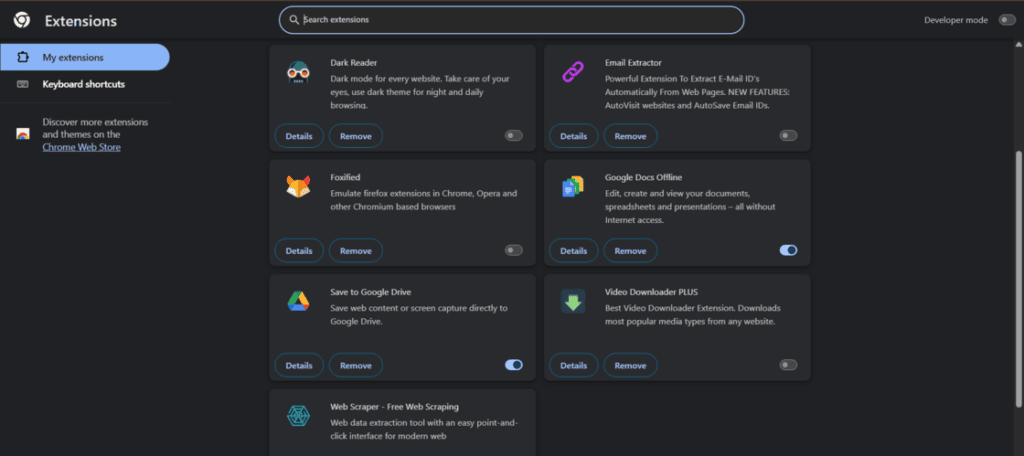
I removed these separate third party tools just to see if ChatGPT alone can handle all these heavy works by itself.
1. Replacing Grammar & Proofreading Extensions
For a long time software like Grammarly or LanguageTool have had a monopoly in the grammar correction market. However the main limitation of these tools is that their free versions can only correct simple typos or spelling mistakes whereas advanced tone adjustment requires a premium monthly subscription.
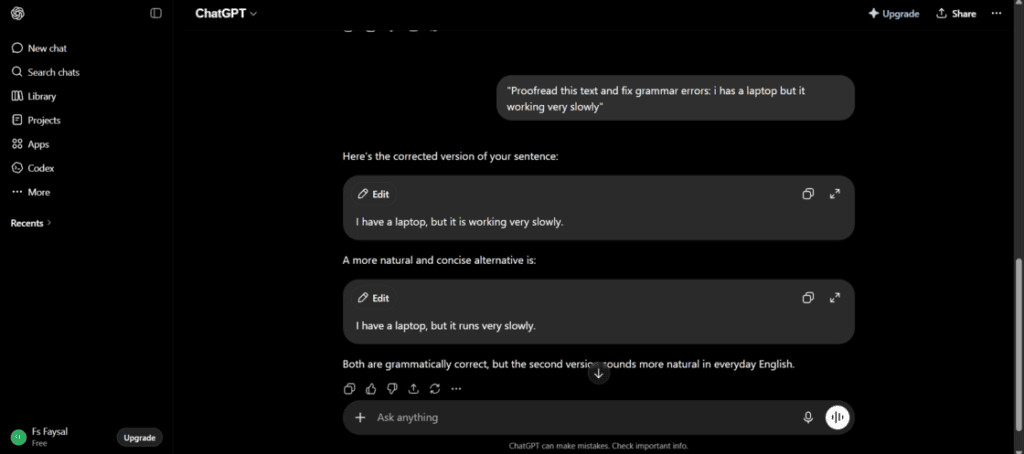
For the purpose of verifying the effectiveness of ChatGPT I gave it a poorly structured English sentence with grammatical and contextual errors as input:
My Prompt: “Proofread this text and fix grammar errors: i has a laptop but it working very slowly”
How the system processed the prompt is displayed below:
💡 My Observation & Personal Opinion:
Where traditional grammar extensions only highlight incorrect words ChatGPT analyzes the complete context there and suggests a more fluent and refined alternative sentence (“I have a laptop but it’s running very slowly.”). Compared to a regular robotic plugin ChatGPT is capable of understanding the natural flow or meaning of human writing very skillfully which greatly reduces the necessity of paid grammar checkers for daily content writing.
2. Replacing Article Summarizers (The Monica AI Alternative)
Most content creators bloggers and researchers use Monica AI or specific summarization tools for quick review of any long report or article. However the big disadvantage of these third party tools is that very limited tokens or credits are given for daily use in their free versions.
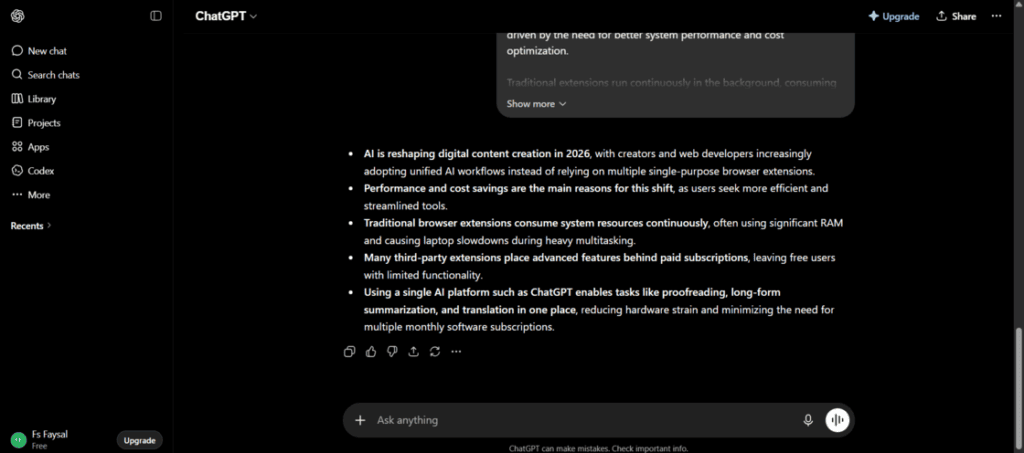
To test the performance of ChatGPT in this case I pasted a long and complex technical content into the chatbox and gave directions to archive its main summary or gist points.
💡 My Observation & Personal Opinion:
ChatGPT was capable of converting a huge article into 5 highly accurate and scannable bullet points in less than just three seconds. Just like its output layout was organized there was no anxiety of running out of any “daily free credit” or limitations like other third party extensions.
3. Replacing Language Translators
Regular translators or translation extensions even Google Translate usually do completely literal that is word by word translation. As a result the translated sentences often sound quite robotic and mismatched or strange with our culture especially when we go to translate any deep thought or complex writing between two different languages like Bangla and English.
To do the final test of ChatGPT I pasted a quite complex Bangla paragraph written about digital marketing trends into it and asked ChatGPT to translate it into completely natural and professional English.
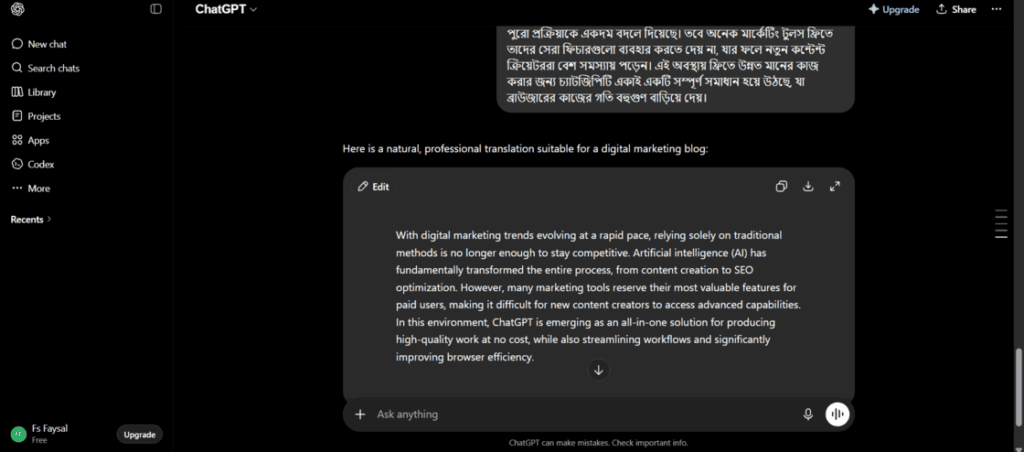
💡 My Observation & Personal Opinion:
The output given by ChatGPT was simply extraordinary in one word! It did not just translate word after word rather it brought out the professional business tone very perfectly. After reading the text it felt as if it was written by the own hand of a native English copywriter whose mother tongue is English which is a very big upgrade compared to our traditional translation plugins.
Comparison Table: Free AI vs. Paid/Premium Extensions
For your convenience in making a decision a direct comparison table based on my own real experience in 2026 is given below:
| Feature | Traditional Browser Extensions (Grammarly Monica etc) | Single Free AI Tool (ChatGPT) |
| System Impact | Consumes a lot of RAM as a result the PC becomes slow or sluggish | Does not leave any extra impact in the background it just runs as a regular tab |
| Feature Limitations | Real and useful features are usually locked behind a premium paywall | Advanced and contextual excellent features can be used completely for free |
| Contextual Intelligence | Quite low these basically work based on certain specific rules and databases | Much higher it perfectly understands the tone humor and inner core meaning of human writing |
| Cost | Can easily cost 10 to 30 dollars per month for separate premium tools | Exactly 0 taka (100% completely free) |
Final Verdict: Should You Make the Switch?
After running this experiment for one continuous week my final answer is yes you should definitely shift to ChatGPT.
For a huge corporate or enterprise team maybe some specific and specialized software might still be needed however for a regular content creator student or blogger about 80% work of daily use small productivity extensions can be very easily managed with just a single free AI tool. After coming to this unified AI workflow I myself have been able to save a lot of RAM of my computer made my work environment much simpler and saved wasteful money spent behind unnecessary software subscriptions.
Do not let the plugins running in the background ruin your laptop anymore. Clean all the clutter of your browser today just keep a single AI tab open and make your work much easier relying on modern technology!
Frequently Asked Questions (FAQ)
1. Will using ChatGPT instead of extensions slow down my work process?
Answer: Not at all. To tell the truth keeping a specific tab open for ChatGPT brings your entire work process into one place. Instead of clicking repeatedly on the icons of three separate extensions you can finish all the work of proofreading summarizing and translation together inside a single chat window.
2. Is the free version of ChatGPT enough to replace paid software?
Answer: Yes of course. For daily regular works like fixing grammar language translation or making summaries of articles the free version of ChatGPT itself is incredibly powerful and it is enough to replace regular premium plugins effortlessly.
3. Do I need to worry about AI detection if I use ChatGPT to help me write?
Answer: Not at all. Google’s core ranking systems completely focus on this matter that how much informative accurate and useful your content is for the readers Google does not care about the fabricated score made by any AI detector. As long as you are editing the text yourself sharing your real experience or observations and formatting beautifully your content will perform great on Google.

Faysal Ahmed is the founder of TexLab AI and regularly writes about AI tools, technology, freelancing, and digital productivity. He has hands-on experience testing AI applications and reviewing online tools.